PHP MySQL Connection management AND Database Operations
The initial step involves establishing a connection to work with the database in PHP.
PHP will therefore need to authenticate itself: we say that it establishes a connection with MySQL.

To connect using PDO(PHP Data Objects), we need to instantiate the PDO class, passing the database source (server + database name) and a username and password as parameters to the constructor.
Method 1: Using a Function
<?php
//PDO connexion
    function Connexion(){


     $hostname = "localhost";
      $username = "The_name_of_your_user";
     $password = "your_password";
     $databasename = "The_name_of_your_DB";

    try {
        $conn = new PDO("mysql:host=$hostname;dbname=The_name_of_your_DB", $username, $password);
        // set the PDO error mode to exception
       $conn->setAttribute(PDO::ATTR_ERRMODE, PDO::ERRMODE_EXCEPTION);
        echo "Connected successfully";
      } catch(PDOException $e) {
        echo "Connection failed: " . $e->getMessage();
      }
      return $conn;

    }
    $dbh = Connexion();
    ?>

/****** Database configuration in another file *****/

// Include the database configuration file
require './connexion.php';
// Call the function to establish a PDO connection
$conn = Connexion();
Method 2: Using a class
With this method, the connection is established within the class constructor. This promotes a more organized and reusable code, especially when you need multiple instances of the connection throughout your application.
<?php
// PDO connexion par la notion d'oriente objet

class connexion {
    private $DSN;
    private $pass;
    private $user;
    public $pdo;

    public function __construct() {
        $this->DSN = "mysql:host=localhost;dbname=The_name_of_your_DB";
        $this->pass = "your_password";
        $this->user = "The_name_of_your_user";

        try {
            $this->pdo = new PDO($this->DSN, $this->user, $this->pass);
        } catch(PDOException $e) {
            echo "erreur" . $e->getMessage();
            die();
        }
    }

    public function __destruct() {
        $this->pdo = null;
    }
}

?>

/****** Database configuration in another file *****/

//Database configuration in another file
require("DB.php");

// Create an instance of the connexion class
$database = new connexion();

// Use the database connection
$pdo = $database->pdo;
Retrieve the results of a query
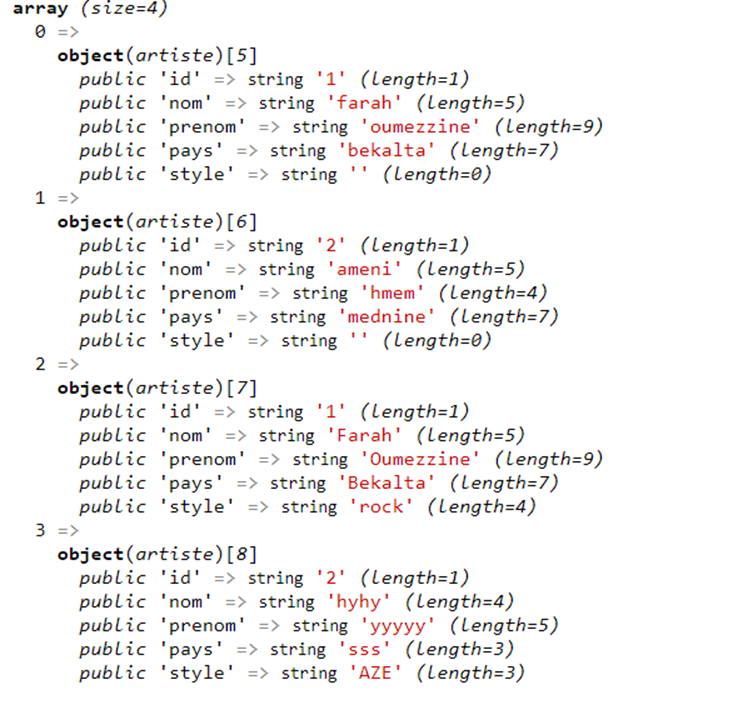
Let’s start with PDO::FETCH_OBJ and PDO::FETCH_CLASS . Both of them are used with PDO (PHP Data Objects) to specify how result sets from database queries should be retrieved.
PDO::FETCH_OBJSpecifies an unnamed object with property names that map to column names.
class artiste
{
    public $id;
    public $nom;
    public $prenom;
    public $pays;
    public $style;
}


$sth=$pdo->prepare("SELECT * FROM artiste");
$sth->execute();
$result=$sth->fetchAll(PDO::FETCH_OBJ);
var_dump($result);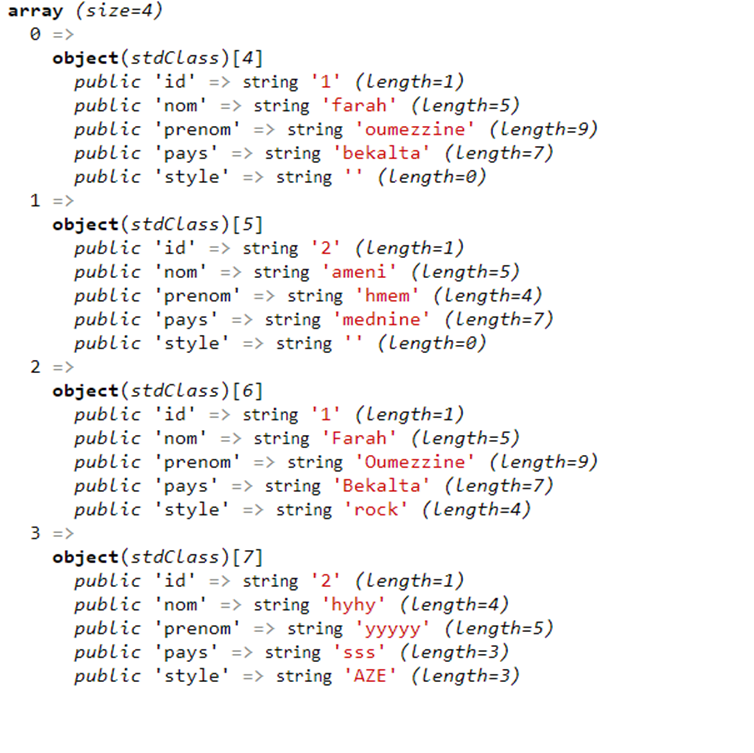
PDO::FETCH_CLASSCreates an instance and maps columns to named properties.
class artiste
{
    public $id;
    public $nom;
    public $prenom;
    public $pays;
    public $style;
}

try {$pdo=new PDO("mysql:host=localhost;dbname=The_name_of_your_DB","The_name_of_your_user","your_password");
    $sth=$pdo->prepare("select*from artiste");
    $sth->execute();
    $result=$sth->fetchAll(PDO::FETCH_CLASS, "Artiste");
    var_dump($result);
    }
    catch(Exception $e){
    echo "<p>ERREUR:".$e->getMessage();
    }
PDO::FETCH_NUMSpecifies an array indexed by zero-based column order.
try{
  $pdostat=$conn->query("SELECT id, nom, prenom, date_naissance, date_arrivee FROM employe");
  $pdostat->setFetchMode(PDO::FETCH_NUM) ;

  while($r = $pdostat->fetch())
  {
      foreach($r as $v)
      echo $v;
  echo "<br>";
  }

}catch(PDOException $e){
  echo "<p>Erreur". $e->getMessage();
  die();

}
}catch(PDOException $e)
{
echo "<p>Erreur:".$e->getMessage();
die();
}
PDO::FETCH_ASSOCSpecifies an array indexed by column name.
try{
  $pdostat=$conn->query("SELECT id, nom, prenom, date_naissance, date_arrivee FROM employe");
  $pdostat->setFetchMode(PDO::FETCH_NUM) ;

  while($r = $pdostat->fetch())
  {
      foreach($r as $v)
      echo $v;
  echo "<br>";
  }

$pdostat=$conn->query("SELECT id, nom, prenom, date_naissance, date_arrivee FROM employe");

$pdostat->setFetchMode(PDO::FETCH_ASSOC);
foreach ($pdostat as $ligne){
echo"<p>". $ligne['id'].''.$ligne['nom'].''.$ligne['prenom'].''.$ligne['date_naissance'].''.$ligne['date_arrivee'].''."<br>";
}
}catch(PDOException $e)
{
echo "<p>Erreur:".$e->getMessage();
die();
}
Insert query
To perform an INSERT query using PDO in PHP, you can follow these steps
- Prepare the SQL Statement
- Prepare and Execute the Query
- Check for Success using the TRY CATCH
<!DOCTYPE html>
<html lang="en">
<head>
    <meta charset="UTF-8">
    <title>formulaire </title>
    </head>
    <body>
        <h1>Formulaire de d'inscription</h1>
        <form action="Untitled-2.php" method="POST">

        <label> NCIN</label>
        <input type="number" name="ncin">

        <label> NOM</label>
        <input type="text" name="nom">

        <label> PRENOM</label>
        <input type="text" name="prenom">

        <label> EMAIL</label>
        <input type="text" name="email">

        <label> MOTDEPASSE</label>
        <input type="text" name="motdepasse">

        <label> URLCV</label>
        <input type="text" name="url_cv">

        <label> CLASSE</label>
        <input type="text" name="classe">

        <button type="submit" class="btn btn-default">
            Send
          </button>
    </form>

    </body>

</head>
</html>
Method 1 :
<?php
require './Untitled-1.php';
$conn=connexion();
if ($_SERVER["REQUEST_METHOD"] == "POST") {
    $ncin = $_POST["ncin"];
    $nom = $_POST["nom"];
    $prenom = $_POST["prenom"];
    $email = $_POST["email"];

    $classe = $_POST["classe"];
    $url_cv = $_POST["url_cv"];
    $motdepasse = password_hash($_POST["motdepasse"], PASSWORD_DEFAULT); // Hash the password


    // Insert data into the database with query
    $sql = "INSERT INTO etudiant (ncin, nom, prenom,email,motdepasse,url_cv,classe) VALUES
     ('$ncin', '$nom', '$prenom','$email', '$motdepasse', '$url_cv', '$classe')";
     $result=$conn->query($sql);

     if ($result === FALSE) {
        echo "Error: " . $conn->errorInfo()[2] . "<br>";
    }

}

?>
Method 2 using prepared statements :
<?php
require './Untitled-1.php';
$conn=connexion();
if ($_SERVER["REQUEST_METHOD"] == "POST") {
    $ncin = $_POST["ncin"];
    $nom = $_POST["nom"];
    $prenom = $_POST["prenom"];
    $email = $_POST["email"];

    $classe = $_POST["classe"];
    $url_cv = $_POST["url_cv"];
    $motdepasse = password_hash($_POST["motdepasse"], PASSWORD_DEFAULT); // Hash the password

/**** IF you want to enter your own records
    $ncin = "1234567890"; // Enter your own value
$nom = "John Doe"; // Enter your own value
$prenom = "Jane"; // Enter your own value
$email = "johndoe@example.com"; // Enter your own value
$motdepasse = "password123"; // Enter your own value
$url_cv = "sasasas"; // Enter your own value
$classe = "infoo"; // Enter your own value
****/

    // Insert data into the database with prepare
    $result=$conn->prepare("INSERT INTO etudiant (ncin, nom, prenom,email,motdepasse,url_cv,classe) VALUES
    (?,?, ?,?, ?, ?, ?)");
    $result->execute([$ncin,$nom,$prenom,$email,$motdepasse,$url_cv,$classe]);
    if ($result === FALSE) {
        echo "Error: " . $conn->errorInfo()[2] . "<br>";
    }

}

?>
Method 3 using prepared statements and bindValue:
<?php
require './Untitled-1.php';
$conn=connexion();
if ($_SERVER["REQUEST_METHOD"] == "POST") {
    $ncin = $_POST["ncin"];
    $nom = $_POST["nom"];
    $prenom = $_POST["prenom"];
    $email = $_POST["email"];

    $classe = $_POST["classe"];
    $url_cv = $_POST["url_cv"];
    $motdepasse = password_hash($_POST["motdepasse"], PASSWORD_DEFAULT); // Hash the password

/**** IF you want to enter your own records
    $ncin = "1234567890"; // Enter your own value
$nom = "John Doe"; // Enter your own value
$prenom = "Jane"; // Enter your own value
$email = "johndoe@example.com"; // Enter your own value
$motdepasse = "password123"; // Enter your own value
$url_cv = "sasasas"; // Enter your own value
$classe = "infoo"; // Enter your own value
****/

 // Insert data into the database with prepare and bind value
    $result = $conn->prepare("INSERT INTO etudiant (ncin, nom, prenom, email, motdepasse, url_cv, classe) VALUES
    (:ncin, :nom, :prenom, :email, :motdepasse, :url_cv, :classe)");

    $result->bindValue(':ncin', $ncin);
    $result->bindValue(':nom', $nom);
    $result->bindValue(':prenom', $prenom);
    $result->bindValue(':email', $email);
    $result->bindValue(':motdepasse', $motdepasse);
    $result->bindValue(':url_cv', $url_cv);
    $result->bindValue(':classe', $classe);

    try {
        $result->execute();
        echo "DONE added";
    } catch (PDOException $e) {
        echo "Error: " . $e->getMessage() . "<br>";
    }


}

?>
Delete query
If you forget the WHERE, the table will be deleted, so be careful!
Method 1 :
<?php
require './Untitled-1.php';
  /************* delete ************/
try {
    $conn=connexion();

  $conn->exec('DELETE FROM etudiant WHERE ncin=100');
  echo " DELETE Done";

}
catch(Exception $e)
{
die('Erreur :'.$e->getMessage());
}
?>
Method 2 using prepared statements :
<?php
require './Untitled-1.php';
  /************* delete using the prepare ************/
try{
    $conn=connexion();

    $sql = "DELETE FROM etudiant WHERE ncin = 4";

    $stmt = $conn->prepare($sql);

    if ($stmt->execute()) {
        echo "deleted successfully";
    } else {
        echo "Error deleting: " . $stmt->errorInfo()[2];
    }
}catch (PDOException $e) {
    echo "Error: " . $e->getMessage();
}
?>
Update query using prepared statements
To do this, you will need two keywords: UPDATE and SET.
<?php
require './Untitled-1.php';
  /************* update ************/
try{
    $conn=connexion();

    $sql = "UPDATE etudiant SET nom='OUMEZZINE' WHERE prenom='jsjzzj'";

    $stmt = $conn->prepare($sql);

    if ($stmt->execute()) {
        echo "Updated successfully";
    } else {
        echo "Error updating: " . $stmt->errorInfo()[2];
    }
}catch (PDOException $e) {
    echo "Error: " . $e->getMessage();
}
?>
Prepared statements are a powerful feature of PHP’s PDO extension that provides a secure and efficient way to execute SQL queries. They offer several benefits over traditional SQL statements
Security: Prepared statements help prevent SQL injection attacks by separating SQL code from the data being passed into the query, ensuring that the data is treated as data and not as part of the SQL code.
Performance: Since the SQL query is precompiled, it can be reused multiple times, reducing the time spent parsing and preparing the query.
Reusability: Prepared statements can be prepared once and executed multiple times with different sets of data. This eliminates the need for repetitive parsing, optimization, and recompilation of the query
- Data integrity: Prepared statements automatically handle proper data type conversion and escaping, ensuring that the data is correctly interpreted by the database. This helps prevent common data-related issues such as formatting errors or data truncation.
Throughout this article, we explored the fundamentals of establishing a connection, retrieving query results, and performing insertions, deletions, and updates.
Happy coding!
Comments
Post a Comment